📨 Viewing Document Actions
TIP
Right-click on any document to see who has acted on it and what notes they added.
Steps to View Document Actions
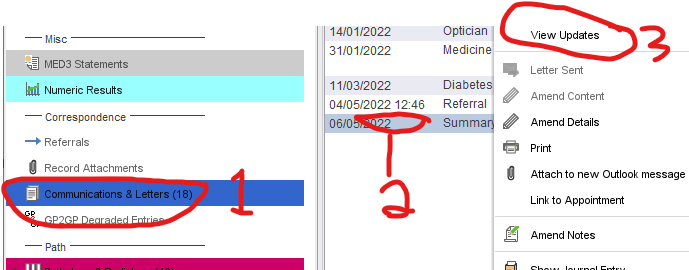
- Click on Communications & Letters in the left-hand column of a patient’s record (yours might be a different colour)
- Right-click the document you want to see actions for
- Click View Updates
You will see a timeline of people the document has been sent to, along with their notes on the right-hand side.
📥 Viewing Incoming Letters Only
By default, SystmOne shows incoming letters mixed with outgoing letters from the practice, district nurses, MCAS, and other community services.
NOTE
Click the Incoming tab at the top of the Communications & Letters box to see only received letters.