📋 What are Tasks?
SystmOne Tasks are a way to send information to yourself or another person regarding a patient, usually with a request or reminder to do something.
Key Points
- Tasks are saved to a patient’s medical record — they can be seen if requested by the patient
- All clinicians and reception staff use tasks
- Some teams use groups instead (e.g., Prescribing)
- Tasks are better than sticky notes — if you’re ill, the surgery can take over your unfinished work
🚫 Don't Send Tasks to Secretaries
Please use lexacomm instead for all secretary communications and requests.
➕ Sending a Task

Click the task button in a patient record to send a new task. The following screen will appear:
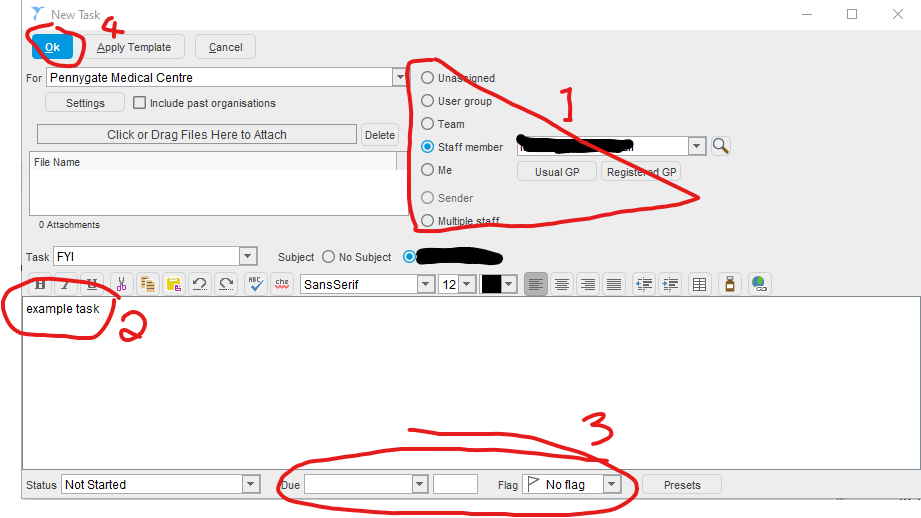
Steps
- Select the recipient for the task (press ‘Me’ to send yourself a task/reminder)
- Write a description — make it appropriate for a patient to see and descriptive enough for anyone to understand
- If time-sensitive or urgent, mark with a red flag and set the due date
- Press OK to send
IMPORTANT
Always check that the person you want to contact actually uses tasks before sending one.
👥 Who Should I Send a Task To?
| Recipient | When to Use |
|---|---|
| Your Reception Buddy | Appropriate reception admin work (booking appointments, arranging blood tests when patient is unavailable) |
| Lynn or Emily | When your Buddy is on annual leave |
| Clinicians | Clinical requests or handoffs |
| Groups | Team-based requests (e.g., Prescribing) |
TIP
Speak to your supervisor to find out who your reception ‘Buddy’ is.
📬 Viewing Tasks Sent to You

At the bottom right of SystmOne, there are icons for home visits, blood test results, incoming documents, and tasks.
NOTE
Tasks are the number on the right-most side of the icon bar. Your tasks are the ones nearest the task icon. Click this number to see your tasks.